Green Grind: Elevate Your Designs with Vibrant Color Typography
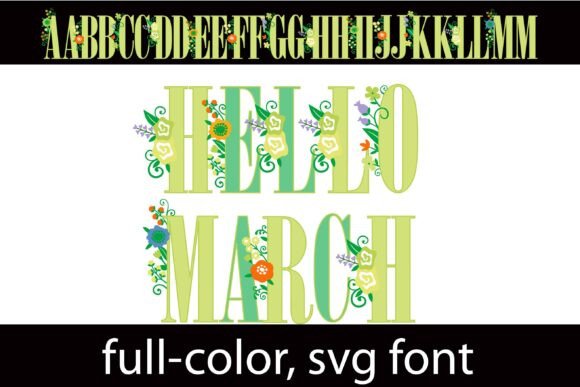
In the crowded landscape of modern design, capturing attention requires more than just standard text; it demands a visual statement that commands immediate focus. The Green Grind font achieves exactly this, offering a striking full-color serif typeface that transforms ordinary headlines into artistic focal points. This isn't your typical black-and-white typography; it is a carefully crafted asset featuring a rich green color palette adorned with delicate florals on the uppercase letters. For graphic designers seeking to inject personality into their work, this font represents a significant shift towards dynamic, expressive typography.
The Rise of Full-Color SVG Typography
Design trends are constantly evolving, and the integration of full-color fonts is reshaping how we approach visual hierarchy and brand identity. Unlike traditional vector fonts, color fonts (specifically SVG formats) contain embedded color data, allowing for gradients, textures, and intricate details directly within the text. This capability eliminates the need for complex workarounds or rasterizing text to achieve a specific look.
The Green Grind font leverages this technology to provide a depth of character that standard fonts cannot match. The serif base offers a nod to tradition and authority, while the green hues and floral embellishments introduce a fresh, organic aesthetic. This blend makes it a versatile tool for projects that require a balance between professionalism and creativity.
Unlocking the Full Potential
One of the standout features of this asset is its versatility through alternate characters. While the primary font provides a cohesive green palette, the package includes an alternate version accessible via your system’s character map. This version expands the creative possibilities by introducing additional colors to the letters, allowing designers to customize their palette further or create multi-toned headings that align with specific client needs. Whether you are working on print design or digital marketing materials, this flexibility ensures your typography remains unique.
Practical Applications for Modern Creators
Understanding where and how to apply a specialized font like Green Grind is key to maximizing its impact. Because it is optimized for titles, displays, and posters, it is an ideal solution for projects where the text needs to do more than just convey information—it needs to evoke an emotion.
Consider the following applications to enhance your design workflow:
- Branding and Logo Design: Create a memorable wordmark for eco-friendly brands, botanical shops, or lifestyle blogs that want to project an image of growth and vitality.
- Social Media Graphics: In a fast-scrolling environment, a full-color serif font can stop the scroll. Use it for Instagram headers, Pinterest pins, or YouTube thumbnails to boost engagement.
- Packaging Design: For products ranging from organic teas to artisanal cosmetics, the floral elements add a premium, handcrafted feel that appeals to discerning consumers.
- Web Design and UI: While body text requires high readability, hero sections benefit from expressive typography. Use this font for landing page headers to establish an immediate visual design tone.
Technical Considerations and Compatibility
When integrating new creative assets into your toolkit, technical compatibility is a crucial factor. It is important to note that full-color SVG fonts render differently depending on the software. In non-compatible programs, the font will default to a solid black appearance. However, for users of Silhouette Studio, the font renders perfectly, making it an excellent choice for vinyl cutting, stickers, and custom merchandise design.
For designers working in Adobe Creative Cloud or modern web browsers, the font will display its full-color glory. This compatibility allows for seamless integration into editorial design, advertising campaigns, and digital products.
Tips for Effective Implementation
To ensure your typography enhances rather than clashes with your overall design, consider these best practices:
- Maintain Visual Hierarchy: Use Green Grind exclusively for headlines or accent text. Pair it with a clean, sans-serif font for body copy to ensure readability and prevent visual fatigue.
- Color Coordination: Pull colors from the font’s palette to use in other design elements, such as background shapes or button colors, to create a cohesive color palette.
- Scalability: Always test the font at the size it will be displayed. Complex details like florals often look best at larger scales where the nuances can be appreciated.
Ultimately, the goal of any design project is to communicate a message effectively while leaving a lasting impression. By incorporating high-quality, expressive assets like the Green Grind font, you bridge the gap between functional text and art. Thoughtful selection of typography not only elevates the aesthetic value of your work but also reinforces the narrative you are trying to build, ensuring your projects resonate with your audience on a deeper level.